

Boost Your Azure Journey: From Zero to Enterprise-Ready in No Time
Use Microsoft’s accelerator to turn best practices into repeatable deployments.

When organizations embark on their cloud journey with Azure, setting up a well-structured, secure, and scalable environment is a top priority. However, configuring an enterprise-grade Azure tenant manually can be time-consuming and prone to inconsistencies.
This is where the Azure Landing Zone (ALZ) Accelerator comes in. It provides an automated, Microsoft-recommended way to establish the foundational structure of an Azure tenant, including:
Management group hierarchy – Organizing subscriptions under a structured governance model.
Policy and compliance enforcement – Predefined Azure Policies to maintain security and best practices.
Identity and access control – Implementing RBAC and integrating Azure AD for governance.
Networking and connectivity – Standardized hub-and-spoke networking configurations.
By leveraging the ALZ Accelerator, organizations can set up their Azure environment efficiently using Infrastructure as Code (IaC) with Terraform and Azure DevOps. This ensures a repeatable, scalable, and compliant deployment, making it easier to manage and extend Azure environments over time.
In this blog post, we’ll walk through how to use the ALZ Accelerator in Azure DevOps to bootstrap an enterprise-ready Azure tenant.
Why Use the ALZ Accelerator to build your tenant foundations?
The ALZ Accelerator helps organizations lay down the groundwork for a well-governed Azure tenant by automating key elements such as:
Management Group Hierarchy
Instead of manually structuring management groups, ALZ defines a pre-configured model based on Microsoft best practices:
Root Management Group (Tenant Root Group)
Platform Management Groups (Identity, Connectivity, Management)
Landing Zone Management Groups (Production, Non-Production, Sandbox)
This helps enforce governance while keeping workloads isolated.

Policy-Driven Compliance
The ALZ Accelerator automatically deploys Azure Policy Assignments to enforce security, monitoring, and cost management best practices.
Examples include:
Tag enforcement for resource consistency.
Security baselines for subscriptions.
Networking policies to prevent non-compliant configurations.
Identity and Access Management (IAM)
With built-in role-based access control (RBAC) configurations, the ALZ Accelerator helps define:
Scoped permissions for different teams.
Privileged Identity Management (PIM) recommendations.
Integration with Microsoft Entra ID (Azure AD) for authentication.
Standardized Networking Architecture
ALZ supports multiple network topologies (hub-and-spoke, virtual WAN) to create a secure and scalable foundation for application workloads.
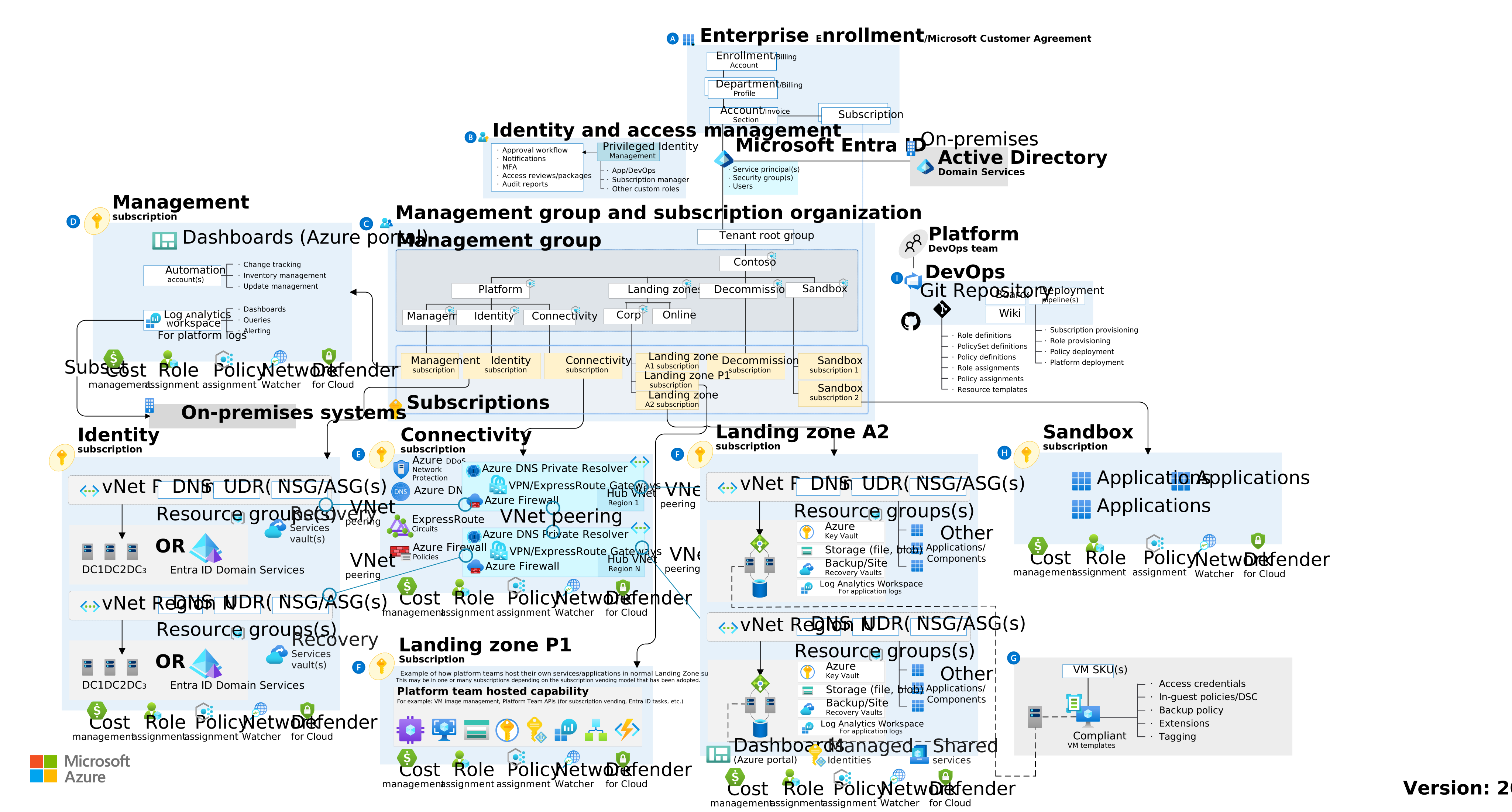
What does the ALZ Accelerator deploy?
Once the ALZ Accelerator is deployed using Terraform and Azure DevOps, the following foundational elements are created within your Azure tenant:
Management Groups – A hierarchical structure organizing Azure subscriptions for governance and isolation.
Azure Policies and Initiatives – Predefined governance rules ensuring compliance with security best practices.
Role-Based Access Control (RBAC) Assignments – Scoped access control across management groups and subscriptions.
Subscription Assignments – Assigning subscriptions to management groups for logical separation.
Networking Baseline – Configurations for a hub-and-spoke or virtual WAN networking model.
Logging and Monitoring Configurations – Integrations with Azure Monitor and Log Analytics for visibility.
With these elements in place, organizations have a ready-to-use tenant that enforces security, governance, and operational best practices across all workloads.
You can find the detailed list of deployed items here: https://azure.github.io/Azure-Landing-Zones/accelerator/#azure-devops
Step-by-step deployment: ALZ Accelerator via Azure DevOps
The usage of the accelerator is split in 4 phases: Planning, Prerequisites, Bootstrap and Run.
The first phase being the planification (naming convention, network choices, design of the architecture and tools), we will skip it. However, it’s a very important phase and you should not take it lightly.
Here a quick schema of what is deployed at each step:

Phase 1 - Prerequisites
Tools
You will also need open access to the internet to download tools, terraform providers and connect to Azure and your Version Control System.
Azure subscriptions and permissions
In addition to the tools, you’ll need in your tenant to have a minimum of:
Management group: In which management group will be place the Landing Zone Structure. In our example we’ll use the Tenant Root Group.
Azure Subscriptions: Depending on the scenario you choose, you’ll need to manually create subscriptions. In our case, we need 3 Subscriptions :
Management: This is used to deploy the bootstrap and management resources, such as log analytics and automation accounts.
Identity: This is used to deploy the identity resources, such as Azure AD and Microsoft Entra Domain Services (formerly Azure AD DS) .
Connectivity: This is used to deploy the hub networking resources, such as virtual networks and firewalls.
Management Group Subscription Placement: Make sure the subscriptions you just created are placed in the management group you choose previously
Azure Authentication and Permissions: To interact with Azure, you need either an Azure User Account or a Service Principal. Both options are drastically different in implementation so be sure to check the official documentation. In both case, you’ll need those permissions:
Owner on your chosen parent management group.
Owner is required as this account will be granting permissions for the identities that run the management group deployment. Those identities will be granted least privilege permissions.
Owner on each of your 3 Azure landing zone subscriptions.
If you choose the authentification with a User Account, you can check your permissions by running this commands:
az login
az account set --subscription "<subscription id of your management subscription>"
az account show
Version control systems
Of course, a very important choice to make is which platform you’ll use store and run your configuration. Your options are Azure DevOps, GitHub or Local File System. For our demonstration we choose Azure DevOps but feel free to check the official documentation for others platforms.
Azure DevOps prerequisites
You’ll need to setup billing for you Azure DevOps organization and billing for parallel jobs. Check Microsoft documentation for detailed steps.
Azure DevOps Personal Access Token (PAT)
A PAT is necessary for the accelerator script to create the base project for your ALZ. Here is the scope it needs:
Agent Pools: Read & manage
Build: Read & execute
Code: Full
Environment: Read & manage
Graph: Read & manage
Pipeline Resources: Use & manage
Project and Team: Read, write & manage Service
Connections: Read, query & manage
Variable Groups: Read, create & manage
A second PAT might be needed if you use self-hosted runners (not our case).
Phase 2 - Bootstrap
First things first, install the ALZ PowerShell module:
Install-Module -Name ALZ
The accelerator consist of running a one-time command that will deploy the base architecture. So the next step is to build your configurations files (Bootstrap configuration and deploy configuration). You’ll need to know which IaC (Infrastructure a Code) tool, in our case we use Terraform but you could choose Bicep.
Now it's getting a little bit more tricky, that the templating and specifications of the different configurations files. Please, keep in mind that you usecase might differ from ours so check the official documentation to be sure.
Create the arborescence of the accelerator project, as it a “one-time” execution, you don’t need to git it.
New-Item -ItemType "file" c:\accelerator\config\inputs.yaml -Force
New-Item -ItemType "file" c:\accelerator\config\platform-landing-zone.tfvars -Force  # Exclude this line if using FSI or SLZ starter modules
New-Item -ItemType "directory" c:\accelerator\output
For the bootstrap, edit the inputs.yaml file.
# For detailed instructions on using this file, visit:
# https://aka.ms/alz/accelerator/docs

# Basic Inputs
iac_type: "terraform"
bootstrap_module_name: "alz_azuredevops"
starter_module_name: "platform_landing_zone"

# Shared Interface Inputs
bootstrap_location: "<region-1>"
starter_locations: ["<region-1>", "<region-2>"]
root_parent_management_group_id: ""
subscription_id_management: "<management-subscription-id>"
subscription_id_identity: "<identity-subscription-id>"
subscription_id_connectivity: "<connectivity-subscription-id>"

# Bootstrap Inputs
azure_devops_personal_access_token: "<token-1>"
azure_devops_agents_personal_access_token: "<token-2>"
azure_devops_organization_name: "<azure-devops-organization>"
use_separate_repository_for_templates: true
bootstrap_subscription_id: ""
service_name: "alz"
environment_name: "mgmt"
postfix_number: 1
azure_devops_use_organisation_legacy_url: false
azure_devops_create_project: true
azure_devops_project_name: "<azure-devops-project-name>"
use_self_hosted_agents: true
use_private_networking: true
allow_storage_access_from_my_ip: false
apply_approvers: ["<email-address>"]
create_branch_policies: true

# Advanced Inputs
bootstrap_module_version: "latest"
starter_module_version: "latest"
#output_folder_path: "/accelerator/output"
For the deploy, you can choose between multiple scenarios template to help you to build your configuration. In this example, we choose the “Single-Region Hub and Spoke Virtual Network with Azure Firewall”. Due to the size and variability of the file, please check the official template for customization. It refers as platform-landing-zone.tfvars file.
Once you put the right informations and configuration in those files, you’re ready to run the bootstrap!
Here the command to run it:
Deploy-Accelerator `
  -inputs "c:\accelerator\config\inputs.yaml", "c:\accelerator\config\platform-landing-zone.tfvars" `
  -output "c:\accelerator\output"
This might take a while but you' will see a Terraform Init and plan, If you’re happy with it, just hit it and it will apply the bootstrap.
Now, you have all the pieces ready to build your Tenant ALZ. Your DevOps organization is ready to run. 🎉
Phase 3 - Run
Last part of this implementation is the deployment of the “actual” ALZ. To do this, you’ll need to run the different pipeline that the Bootstrap juste created in your Azure DevOps project.
Running the ALZ Pipelines in Azure DevOps
Navigate to dev.azure.com and sign in to your organization.
Navigate to your project.
Click Pipelines in the left navigation.
Click the 02 Azure Landing Zones Continuous Delivery pipeline.
Click Run pipeline in the top right.
Take the defaults and click Run.
Your pipeline will run a plan. If you provided apply_approvers to the bootstrap, it will prompt you to approve the apply stage.
Your pipeline will run an apply and deploy an Azure landing zone based on the starter module you choose.
Now, your ALZ should be populated with those resources:
Management group hierarchy
Subscription assignments
Azure policies and RBAC
Networking configurations
Conclusion
Using the ALZ Accelerator with Terraform and Azure DevOps provides a repeatable, automated way to establish a secure and scalable Azure tenant foundation.
✅ Governance & Compliance – Predefined management groups, IAM roles, and Azure Policies.
✅ Security Best Practices – RBAC and policy-driven controls for workloads.
✅ Scalability – A structured framework that supports future growth.
Further reading and official resources
For additional details and customization, refer to the following Microsoft documentation:
🔗 Azure Landing Zones Accelerator Overview – https://azure.github.io/Azure-Landing-Zones/
🔗 Terraform Implementation Guide for ALZ – https://github.com/Azure/terraform-azurerm-alz
🔗 Azure Enterprise-Scale Documentation – https://learn.microsoft.com/en-us/azure/cloud-adoption-framework/ready/enterprise-scale/
🔗 Azure Landing Zones GitHub Repository – https://github.com/Azure/Azure-Landing-Zones