

Our Internal AI Platform: From General-Purpose Assistant to Business Tool
Summary
An internal AI Platform that combines the latest models with access to our own systems, built to solve shadow AI while keeping data and platform under our control.
This article doesn't cover the implementation itself, but gives an overview of the architecture and of the main capabilities it enables.
Introduction
In a matter of months, generative AI went from curiosity to everyday work tool, without anyone really deciding it should. Writing, summarizing documents, coding help, translation, meeting prep: the use cases multiplied because they save real time, and because the tool is one browser tab away.
That's exactly the problem. With no internal alternative, people turn to consumer assistants and paste in whatever they have on hand: an excerpt from a contract, a production log, a piece of proprietary code, a customer file. This is what's known as shadow AI, the use of AI tools that haven't been vetted by the organization, outside any security or compliance framework. Unlike classic shadow IT, the risk doesn't stop at an unapproved service: the data leaves the perimeter, may be retained by the provider, reused to train its models, and the company has no visibility into who shared what. Banning it doesn't work, the usage simply goes underground. The only workable answer is to offer an alternative that's at least as good, in-house.
That's where our internal AI Plateform started. The goal was to build a tool that met four requirements at once:
A genuinely good conversational assistant, one that holds up against what's publicly available.
The ability to work with sensitive data, asking questions about our internal documents and repositories without wondering where they end up.
Connectivity to our business systems, moving from a general-purpose assistant to something that knows our context and can work inside it.
Support for external coding agents (Codex CLI, OpenCode and the like), pointed at our platform rather than straight at a vendor.
All of it while keeping access to the latest GPT models, with contractual and technical guarantees that our prompts are never stored, reviewed, or used for training, and with the entire platform layer (interface, authentication, history, connectors, access management) hosted in our own infrastructure.
Architecture Overview
REMARK: This is the configuration we have implemented in our infrastructure. However, there are many features available across the different components to improve or adapt this setup to your specific needs.
Here's the architecture we've implemented:
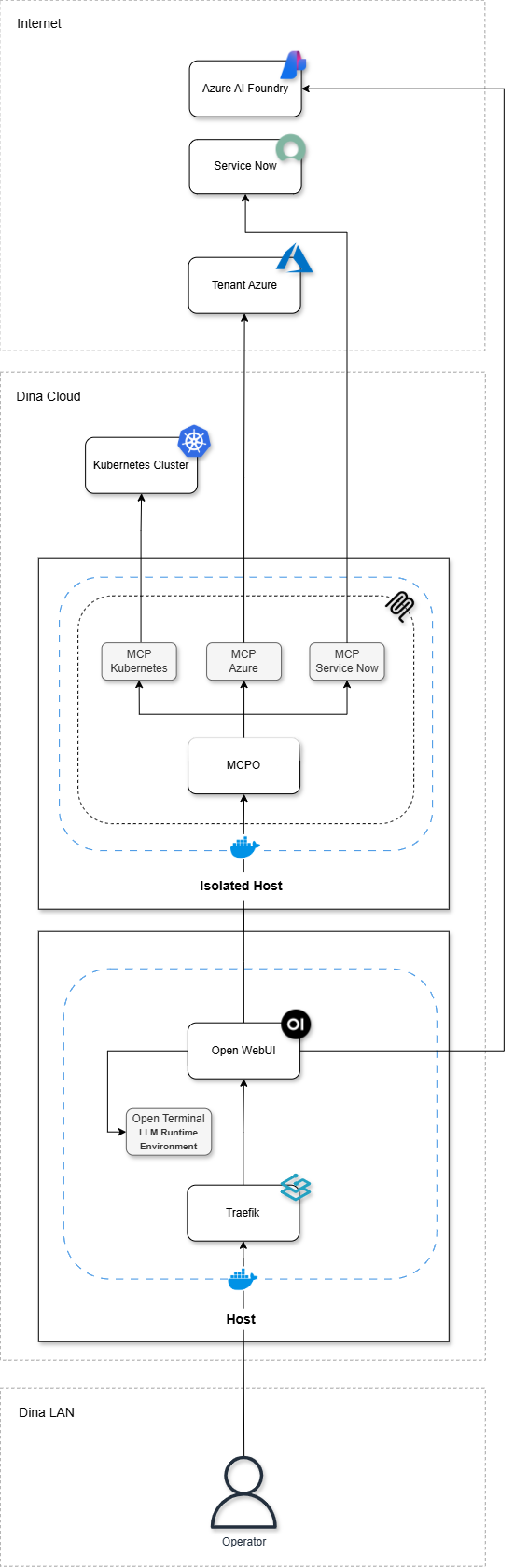
It rests on four pillars, described below.
1. Open WebUI: the main platform
The central building block is Open WebUI, a self-hosted open source chat interface compatible with OpenAI-format APIs. In practice, it delivers the experience users expect (conversations, history, sharing, file attachments) while leaving the organization in control of everything that happens behind it.
Everything is managed from this interface:
Model management and RBAC, we declare which models are available and decide, group by group, who gets access to what. An expensive reasoning model can be reserved for specific teams, while a translation model stays open to everyone.
RBAC on business integrations, the same logic applies to MCP servers, our connectors to internal platforms, delegated per group and per tool. A support team may reach ticketing data without ever touching cluster operations.
Identity synchronization, group membership comes from our directory via OIDC/SSO, so there's no parallel user base to maintain.
API exposure, Open WebUI exposes its own OpenAI-compatible API, which is what lets external coding agents run against our platform rather than straight against a vendor. Covered further down.
Shared workspaces and prompts, each team can build on its own prompts and its own knowledge bases.
2. The MCP layer: wiring the assistant into our systems
To turn a general-purpose assistant into a business tool, it needs access to our systems, and that's what the MCP layer is for.
MCP (Model Context Protocol) is an open standard defining how a model connects to external tools and data. A system exposes its capabilities through an MCP server, and any compatible client can use them, with no custom integration to build for each case.
MCPO sits at the heart of this layer: a bidirectional translator between HTTP and the MCP protocol. It loads the declared MCP servers and exposes their native capabilities as HTTP endpoints, handling all protocol conversion behind the scenes. This piece was necessary in our case: Open WebUI consumes external tools over HTTP, whereas most MCP servers run locally over stdio.
The trade-off is that this component concentrates sensitive data, in particular the credentials to our platforms. It therefore gets dedicated segregation at both host and network level: an isolated machine on its own vLAN, exposed on a single port, reachable only from the host running Open WebUI. Secrets stay isolated from the chat platform and are never exposed to users or models.
That segregation protects the credentials, not the capabilities they unlock. Anyone able to reach an authorized session can still invoke the tools that session is entitled to, and read whatever they return. Access to downstream systems therefore has to stay constrained on its own terms: per-tool authorization, least-privilege service accounts, network segmentation and auditability.
The connected platforms and what they bring to daily work are covered in a dedicated chapter further down.
3. Open Terminal: an execution environment
By default, the model has no execution environment: it produces text, nothing more. The moment you want to generate a file, transform data or run a script, it needs somewhere to execute code.
Open Terminal fills that gap. Deployed in multi-user mode, it's a container where the model can run code, generate documents or manipulate files, with a dedicated directory per user. That environment is deliberately constrained: isolated from the internet, and shipped with a preinstalled toolset covering what we actually need. The model works with what it's given, with no unchecked dependency installs and an execution surface we control.
4. Azure AI Foundry: the models
That left the most structural question: where do the models come from?
We went with Azure AI Foundry. Microsoft has an agreement with OpenAI that allows it to host the GPT models in its own datacenters, in our case in the Switzerland North region. Inference is therefore processed in Switzerland, while still giving us access to the latest GPT generations without operating a single GPU.
On the data side, Azure OpenAI doesn't use prompts to train or improve models: that's granted by default. What remains is the abuse monitoring mechanism, which temporarily retains prompts and responses to allow human review in case of misuse. It can be disabled through an exemption process validated by Microsoft, which is what we did: the result is Zero Data Retention.
Concretely, prompts and responses are processed in Azure for inference but, under the approved Zero Data Retention configuration, they are not retained by the model service, reviewed by humans, or used for training. That's what makes it acceptable to ask questions about sensitive data.
The models are therefore consumed outside, while the entire platform layer stays with us.
Day-to-day use: from conversation to shared workspace
The foundation: a conversational assistant
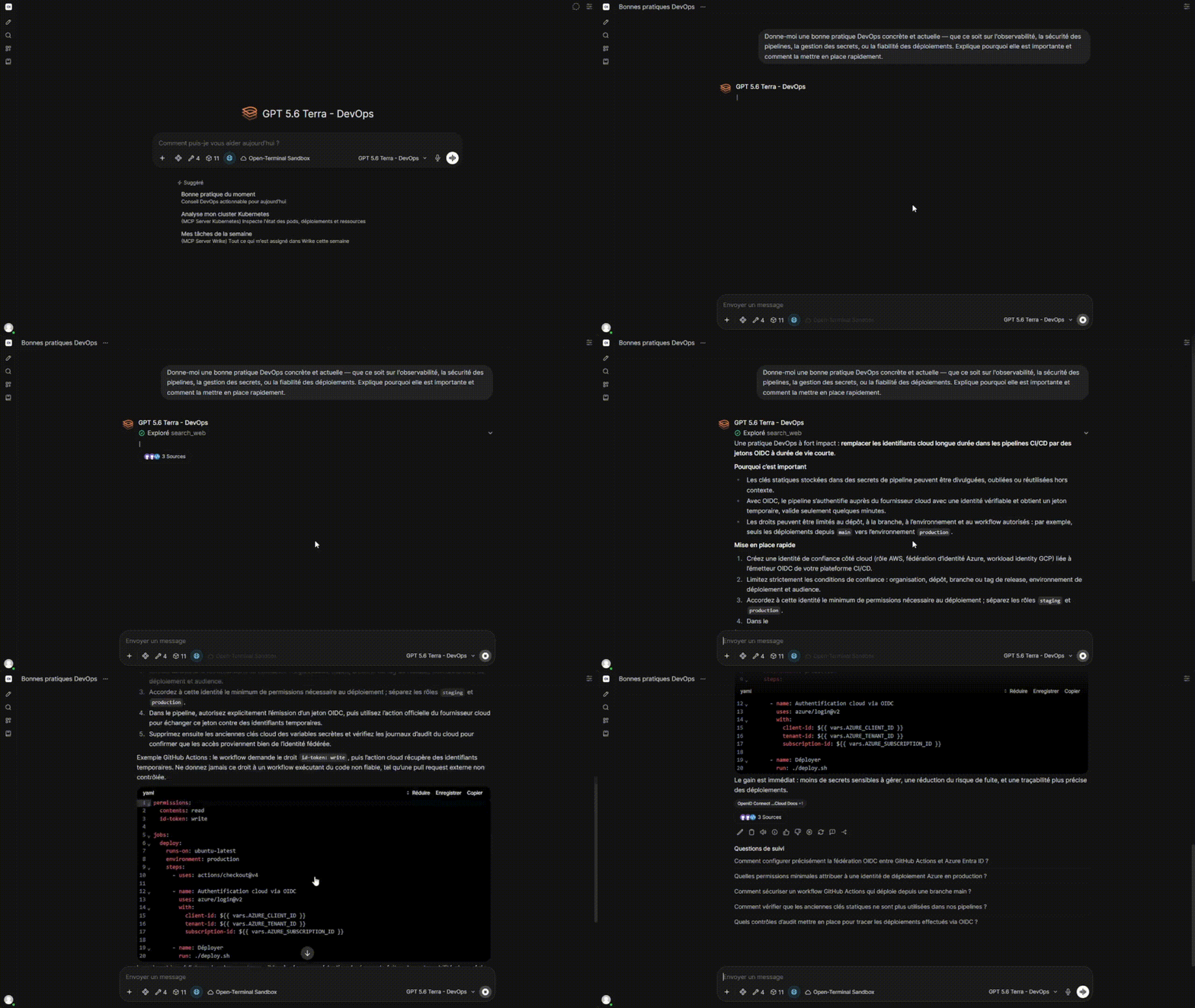
Open WebUI consumes the models exposed by Azure AI Foundry. Users therefore get the latest GPT generations and talk to the assistant exactly as they would with any consumer tool: open questions, writing, summarizing, rewriting, analyzing attached documents. This is the entry condition. If the baseline experience falls short, nobody leaves the public tools behind.
Building up and sharing
Beyond plain conversation, users can enrich the tool themselves:
Prompts, reusable instructions, called up with a shortcut, for recurring tasks.
Knowledges, document collections the assistant queries so it answers from our internal content rather than from its general knowledge.
Skills, specialized behaviors, tailored to a specific role or type of task.
More importantly, all of these can be shared. A team can publish its prompts and knowledge bases to its own group, or more widely. One person's work benefits everyone else, without each user reinventing their own corner of the wheel. This is what turns the platform from an individual tool into a collective asset.
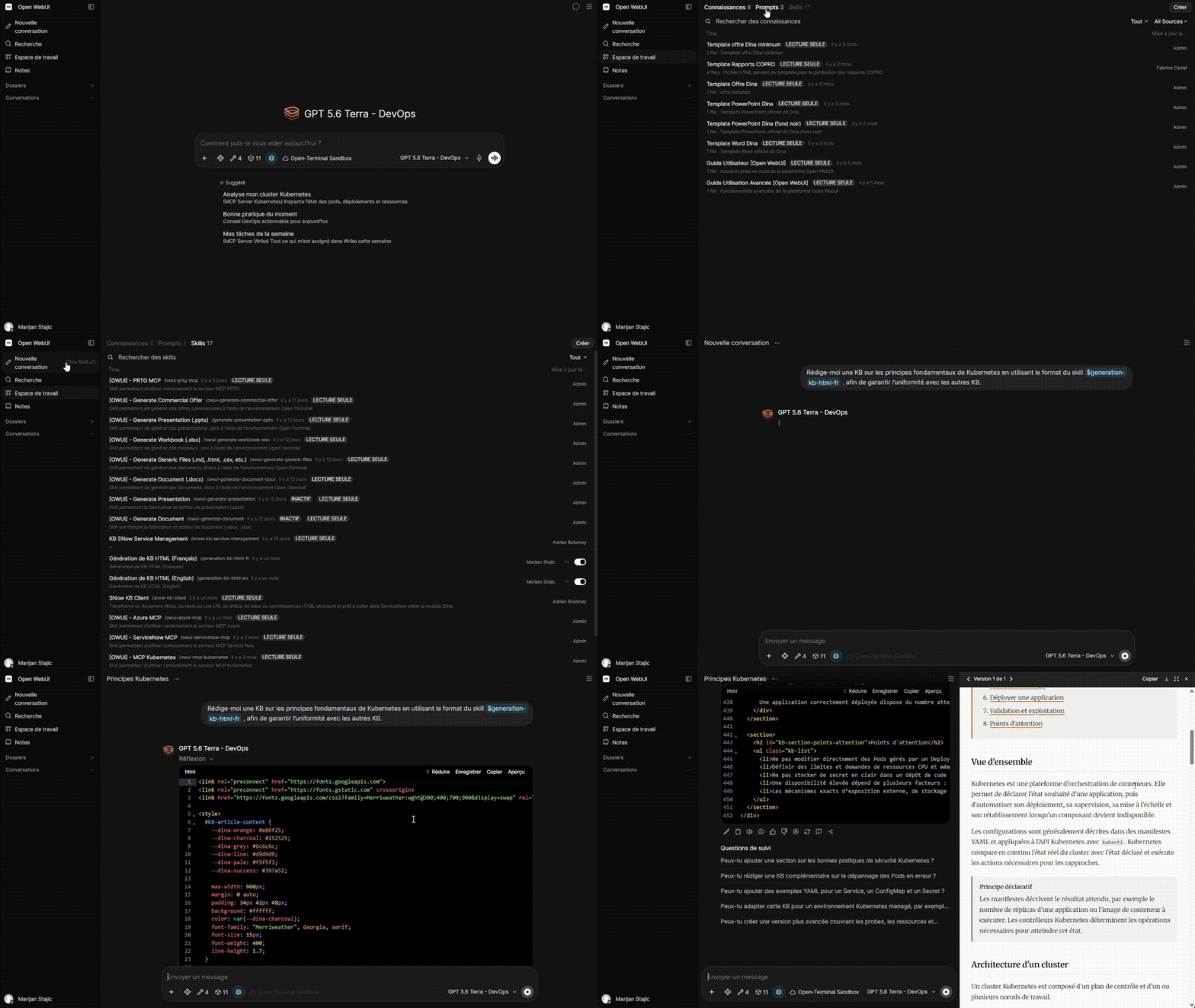
In the clip above, you can see the different categories: prompts, knowledges and skills. We then ask the assistant to generate a knowledge base article from our generic HTML document skill, so that our documentation keeps a consistent format across the board.
A shared environment with the LLM
The execution container described above isn't just for the model. Each user's directory is directly accessible to them as well: you drop a file in, ask the assistant to process it, and collect the result. It is, quite literally, a shared desk between the user and the LLM.
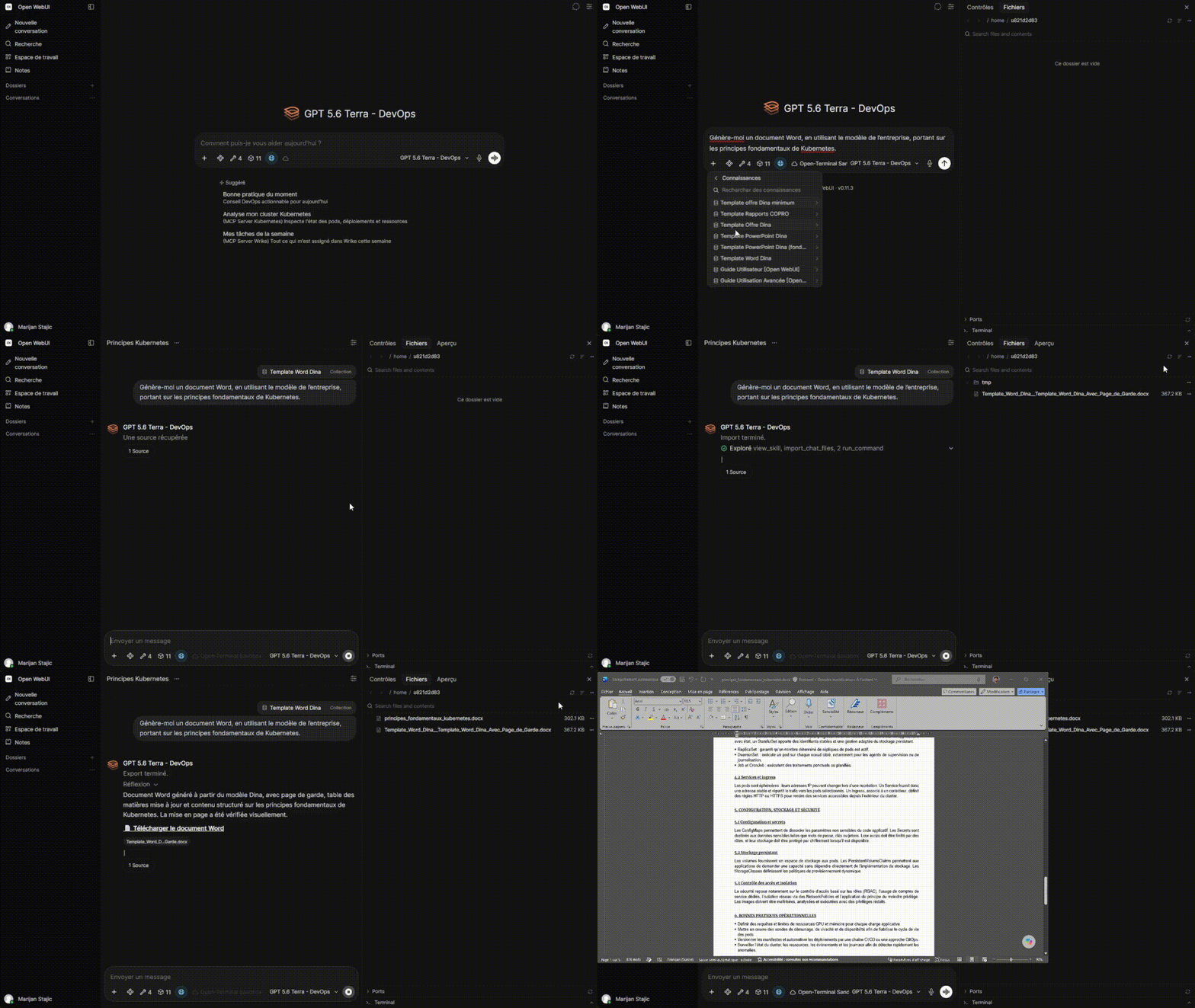
In the video, we ask the assistant to produce a Word document based on the company template, covering the core principles of Kubernetes. It generates the file and drops it straight into the directory it shares with the user.
Business integrations: when the assistant queries our systems
This is the tipping point between a general-purpose assistant and an actual work tool. A model with no access to our systems can only reason in a vacuum. Wired into our platforms, it becomes able to go fetch the information itself, at the moment it's asked for.
We gradually connected the platforms that carry our daily operations. Kubernetes gives access to the state of clusters, pods and deployments, along with logs and events. Azure opens up visibility on tenant resources, their configuration and their consumption. ServiceNow exposes incidents, requests and changes with their history. And plenty of other integrations on top, depending on our internal infrastructure (Veeam, Rubrik, and so on).
The immediate win: no more collecting
Answering a simple question used to mean opening three consoles, authenticating on each one, and copying results somewhere. Today the question is asked in plain language and the assistant goes and looks for itself. Which backup jobs failed last night? Which pods are crash-looping on this cluster? How much is this resource costing this month?
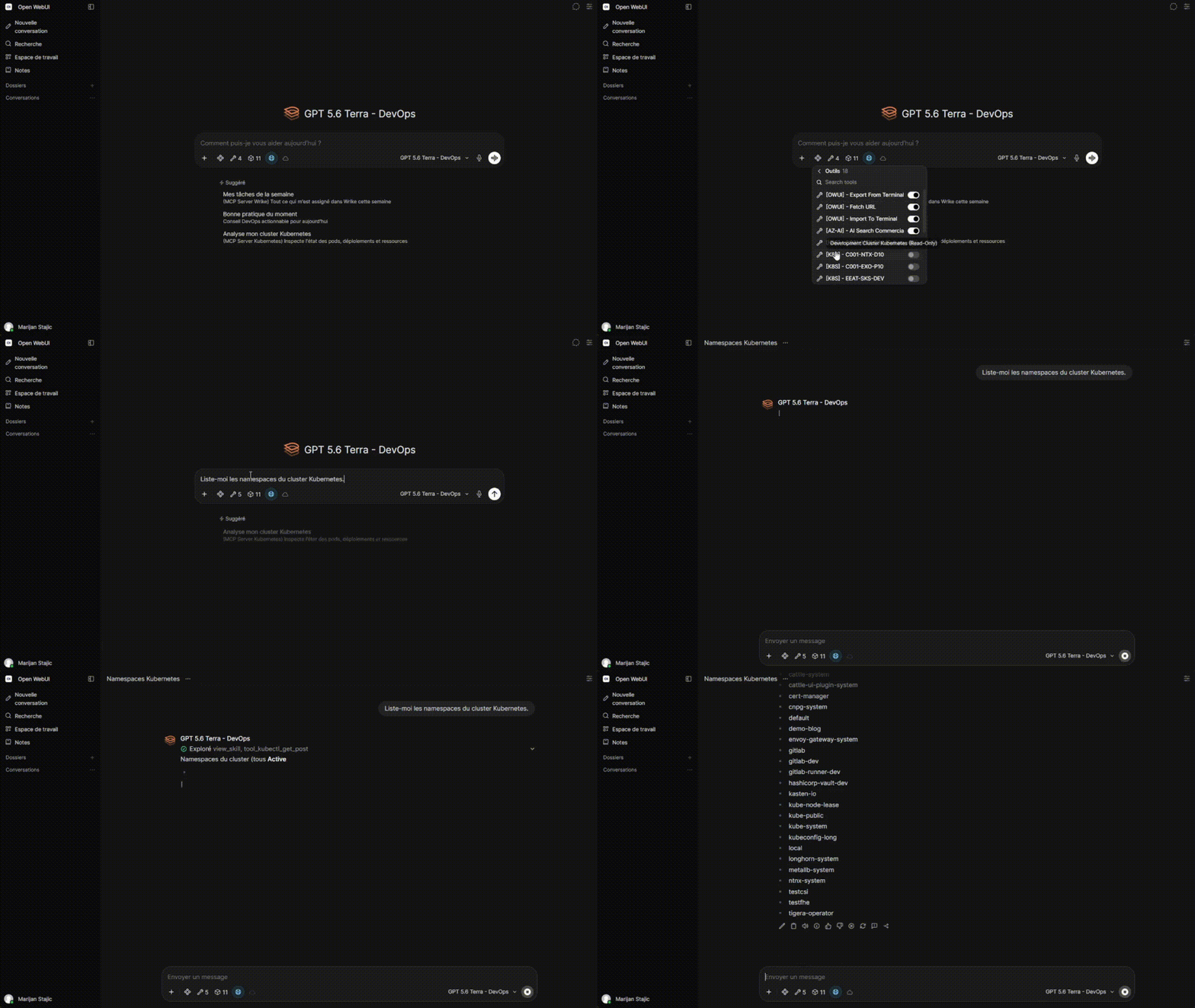
The gain isn't just keystrokes saved, it's access. Someone who doesn't know kubectl, or who isn't used to navigating the Azure portal, still gets a usable answer. Knowing how to query a system is no longer a prerequisite for getting information out of it.
Pushed further, the same mechanism scales to work that used to take days: we covered that in Audit Your Entire Azure Tenant in Under 20 Minutes: AI-Driven CAF & WAF Compliance.
The real payoff: crossing platforms
The value becomes obvious once you start chaining sources. The most telling scenario for us starts with an incident.
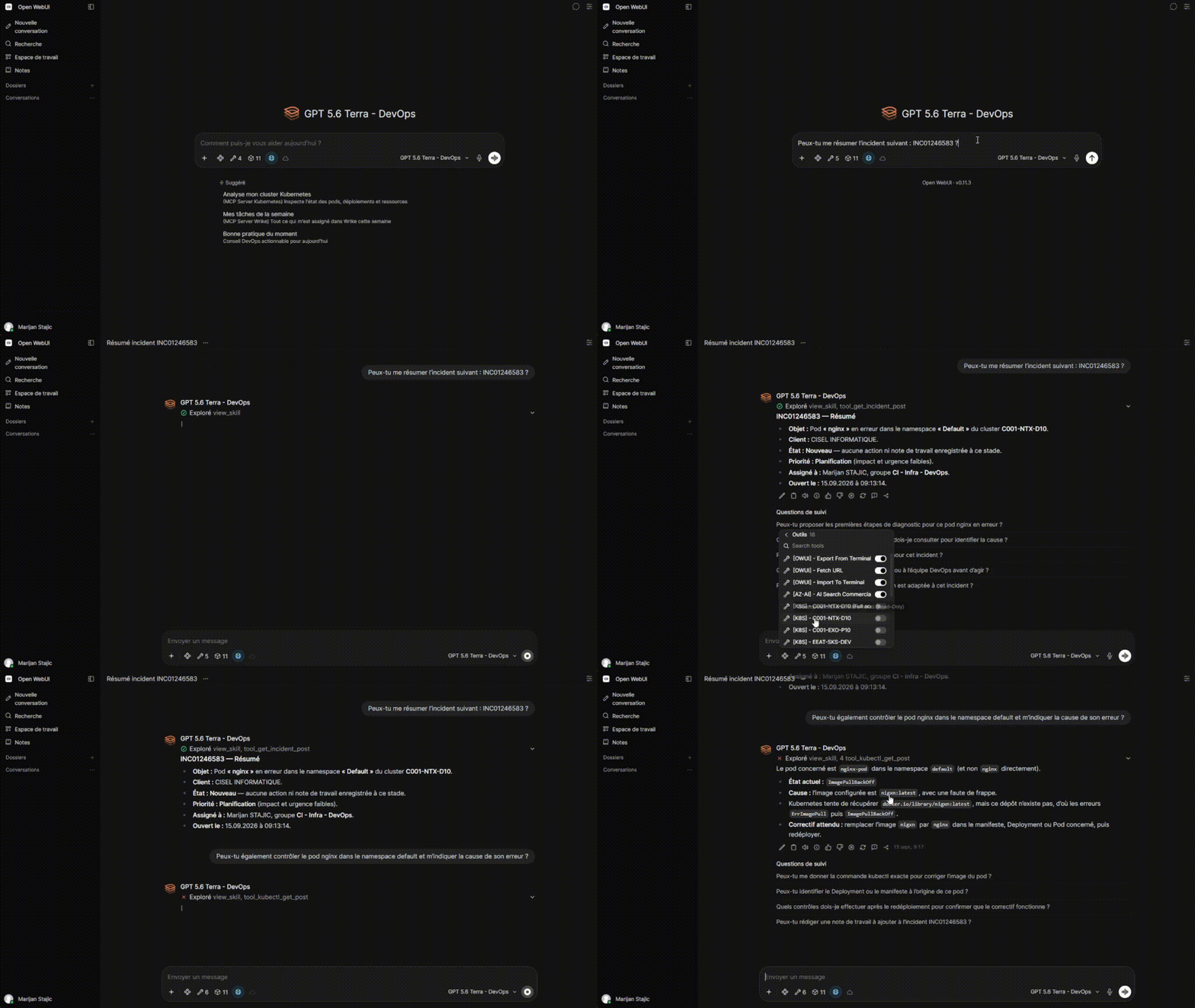
The flow looks like this:
Pull the incident from ServiceNow, we ask the assistant to fetch the ticket and summarize it: the context, the scope, what's already been tried, what the user wrote.
Move on to the system involved, go see what's happening on that cluster. The assistant heads over to Kubernetes to report workload status, recent events and errors.
Get to the symptom, in a single conversation, we've gone from ticket to technical cause, without switching tools and without rebuilding the context by hand.
A complementary project is in the works, in the same vein as Building the N1 Agent: An AI-Powered Kubernetes Assistant: n8n picks up the incident as soon as it's created, triggers the analysis, and writes the result directly onto the ticket. This time the scope extends to all our tools, and that's precisely where the combination makes sense. Automation handles the first level with no intervention, while Open WebUI remains the place where you dig, query and cross-check when the automated analysis isn't enough.
The boundary: read-only, by design
All our integrations are read-only. The assistant reads, correlates and reports back. It changes nothing, opens no tickets, restarts no pods, reruns no jobs. The same applies to the accounts backing the execution container: they carry read permissions only.
That's deliberate. Most of the value sits in gathering and cross-referencing information, which is where the time goes, not in carrying out the action itself, which is quick once the diagnosis is made. Going write would push the tool into a different risk category: a wrong action on a cluster or a tenant isn't as easy to walk back as an approximate answer. As long as the model remains fallible, the decision and the action stay human.
That choice also has a practical effect: it drastically lowers the barrier to adoption. Opening read access to a platform is a conversation. Opening write access to a conversational assistant is a much harder one.
Coding agents: the platform beyond the interface
Asking for code in a chat window works fine for a single function or a standalone script. But copy-pasting a result from a browser into your editor already feels like the old way of doing things.
Developers today work with coding agents: Codex CLI, OpenCode, Claude Code and others. The difference with a regular chat is fundamental: the agent runs directly inside the project. It reads the file tree, opens the relevant files, writes changes to disk, runs the tests, fixes what breaks and goes again. You no longer ask it to "write me a function that...", you ask it to "add OIDC authentication to this application" and it handles the rest, file by file. That's what makes vibe coding possible: describe an intent, let the agent build, keep control over the review.
The catch is that these tools point at a vendor's API by default. A developer who installs Codex CLI and pastes in their own key is doing shadow AI, except this time it's proprietary code leaving the workstation directly, without passing through any kind of approval.
Our architecture covers this case. Open WebUI exposes an OpenAI-compatible API, which is all these tools need:
The user generates an API key from their Open WebUI profile.
They put it into their agent, with our platform's URL as the base URL.
The agent now runs against our infrastructure. It consumes exactly the models the user is entitled to, since the RBAC defined in Open WebUI applies the same way it does in the interface. The code that transits through it falls under the same Zero Data Retention guarantees as the rest, and the usage stays visible on the platform side.
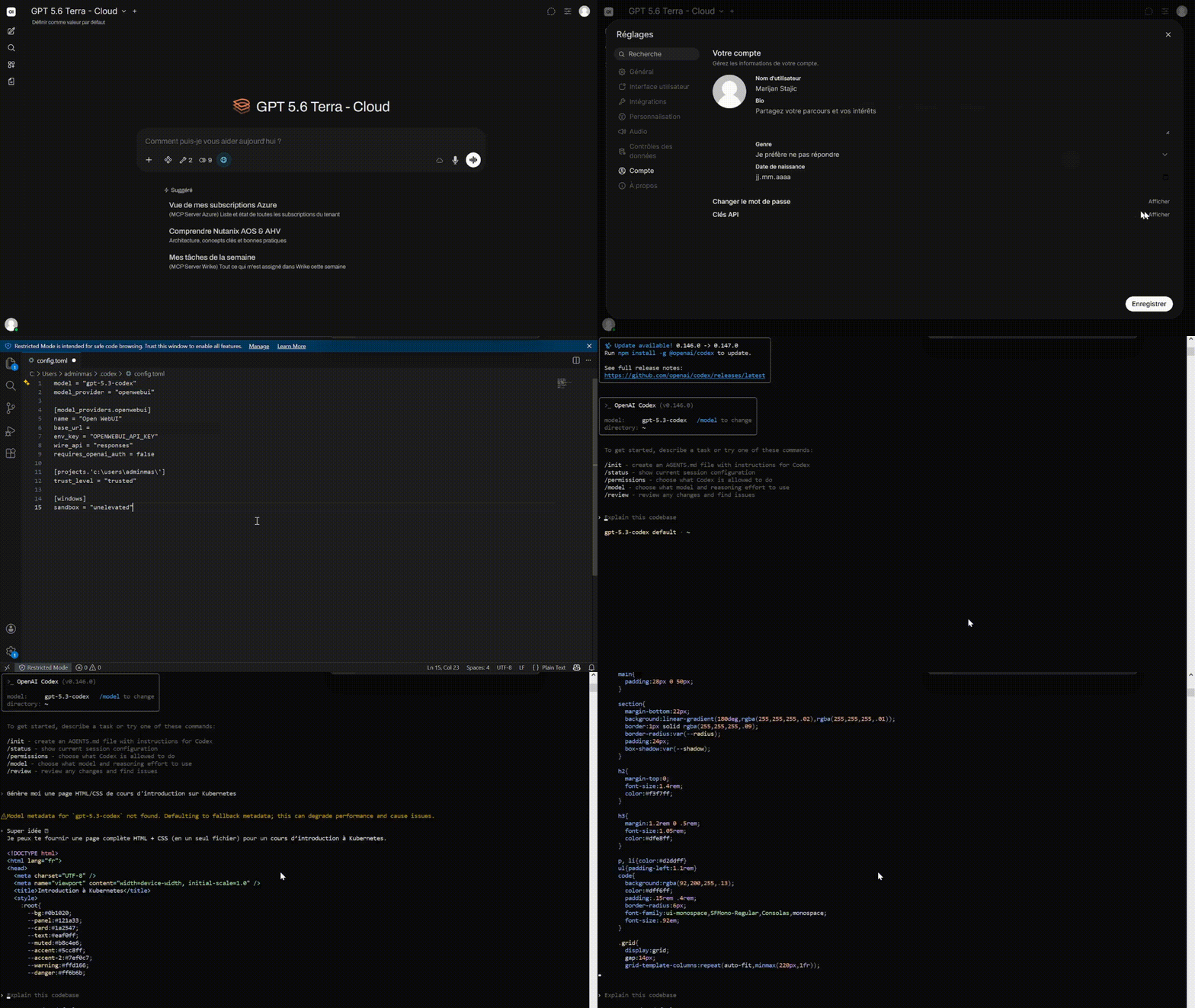
Open WebUI then stops being a mere chat interface and becomes what it really is: a model access platform, consumable from a browser or from a terminal alike, under a single set of rules.
Challenges and conclusion
What we've explored throughout this article is only part of what the platform makes possible. Open WebUI comes with a whole set of mechanisms to extend and tailor it: tools, functions, sub-agents, shared channels, automated knowledge base syncing and more. We use some of it, not all of it, and the room left to adapt the platform to a given context is considerable.
The main difficulty was a temporal one: the field moves constantly. Open WebUI ships releases at a fast pace, new features keep appearing, and the models themselves evolve. We discovered possibilities along the way, often after having already implemented something else. Building while adapting, revisiting earlier choices, avoiding locking down anything that was bound to change: that's the reality of a project on ground that shifts while you walk on it.
It's also worth noting that a lot of the upstream configuration isn't described here (hardening, directory integration, certificate management, fine-grained tuning of each component) simply because the article would lose its readability. The architecture presented is the skeleton, not the full extent of the work.
Then comes the least technical and most decisive point: adoption. Making the tool available isn't enough. Users arrive with consumer chat reflexes and gradually discover shared prompts, knowledge bases and business integrations. Yet that's where everything is decided, because shadow AI isn't defeated by banning it, but by offering an alternative. As long as the internal tool gives access to the same models with an equivalent experience, going through an external service stops being a question. And with the integrations into our systems, it now does what no consumer assistant ever will.
If this topic interests you and you'd like support in going down this road, Dina has recently launched a dedicated service: Analytics & AI.


