
Disaster Recovery with Kasten K10 on Kubernetes

As we already describe how to install and configure Kasten on Kubernetes in another article, in this one we will describe the way to recover a Kubernetes cluster with Kasten. .....
Restore the DR on a new cluster
On a new cluster, with a fresh Kasten installation, you have to create a new location profile. The informations of this profile is the bucket where you have stored your backup and DR.
If you already have a kasten installed on the cluster, first you will have to delete it.
# Delete the kasten-io namespace.
kubectl delete namespace kasten-io
**Then reinstall a fresh version of Kasten K10 using helm. ** You can follow instruction from ou arctile on the subject or on kasten.io.
When you enabled the K10 DR, you had to save the passphrase for a potential restore. This is the time to use it, so store it in a secret like this :
kubectl create secret generic k10-dr-secret --namespace kasten-io --from-literal key=<passphrase>
After that, to restore the cluster, you have to launch the following command, with theses parameters :
source-clusterID is the cluster id that you get when you create the DR
location-profile-name is the profile that you just created
# Install the helm chart that creates the K10 restore job and wait for completion of the `k10-restore` job
# Assumes that K10 is installed in 'kasten-io' namespace.
helm install k10-restore kasten/k10restore --namespace=kasten-io \
    --set sourceClusterID=<source-clusterID> \
    --set profile.name=<location-profile-name>
Once the restore done, you can find back all your applications, with the "Removed" filter.
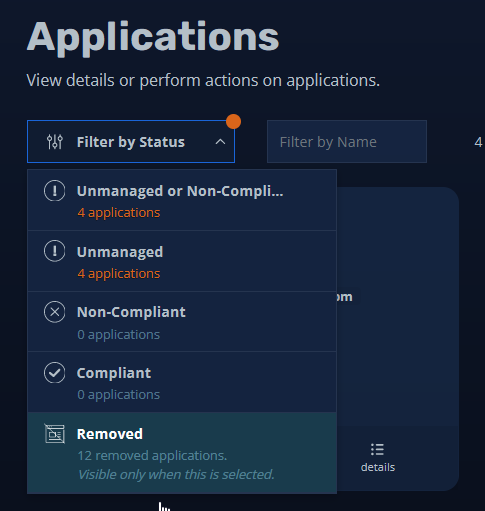
You can restore every application, one by one. When selecting your restore point, make sure to select one from your s3 location (or whatever you use as remote backup storage). Local snapshot restore will not work at this moment.

One important thing is to not forget to restore the Cluster-Scoped-Resources. These are not present in namespaces such as CRD or RoleBindings etc.. You should restore the CRD if your applications are using it. You should also be aware that if you restore on a target kubernetes cluster that has not the same version as the source, you may have to adapt a bit some resources.
You can see the restore progress through the Dashboard.
Feel free to comment this article if you have questions.
www.cisel.ch
References https://docs.kasten.io/latest/index.html